商品加载中…

英国 Apple ID 下载账号|App Store 应用商店登录|禁止登录系统设置/iCloud|质保7天

英国 Apple ID 下载账号,适合在 App Store 应用商店登录下载美区应用。下单后自动发货,仅限 App Store 使用,请勿登录 iCloud 或手机系统设置,提供7天质保。

价格:18.00 CNY

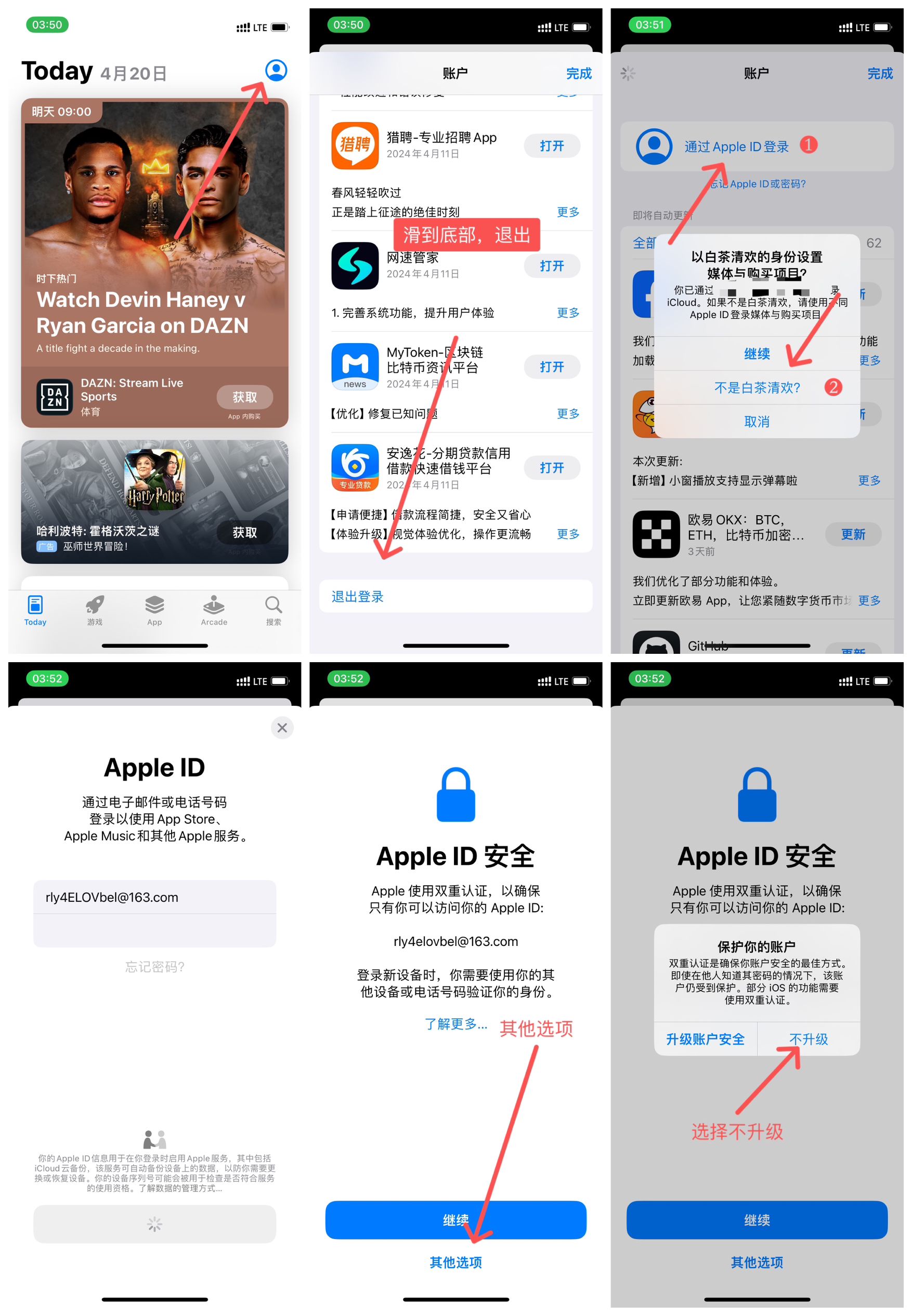
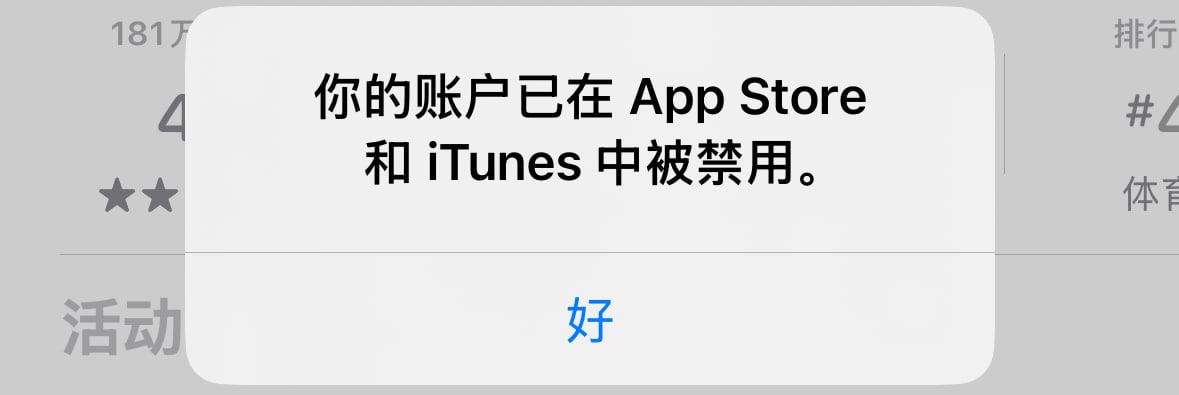
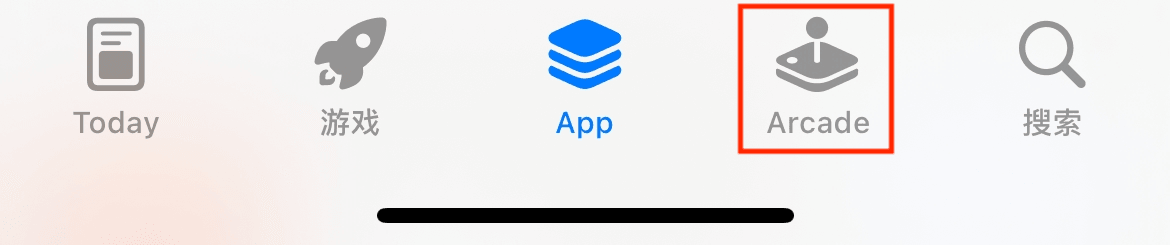
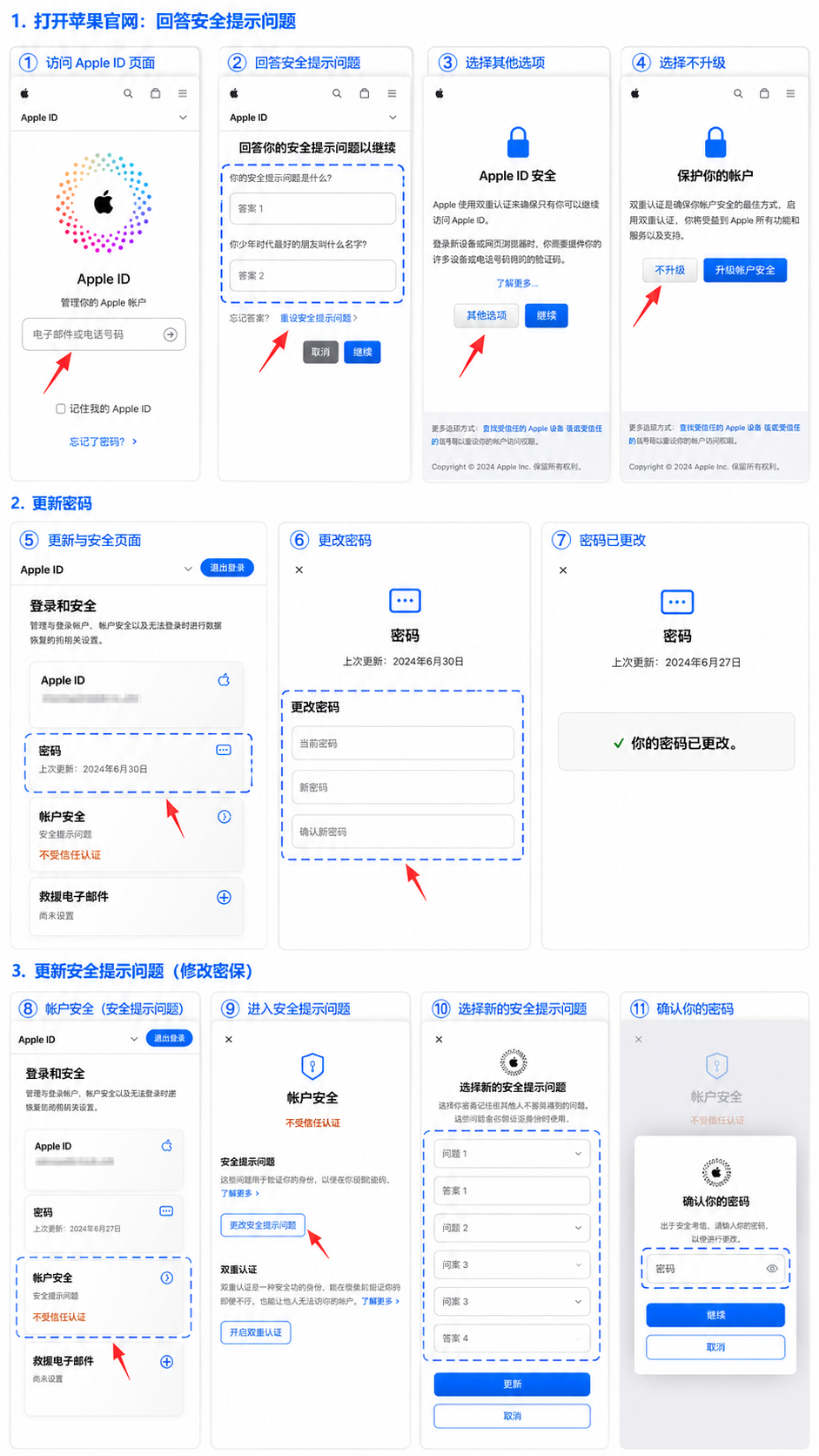
<p<strong英国苹果&nbsp; ID账号只能用于 AppStore 下载软件,未激活 iCloud、不支持FaceTime和iMessage等苹果服务</strong<br<strong⚠️&nbsp;账号禁止在设置iCloud登录会被锁机,停用无法退出iCloud,大部分未激活iCloud无法登陆,如果你非要激活登录设置iCloud,登陆后一定要【关闭查找手机】避免苹果风控 死号 造成锁机。<br</strong【注意】虚拟产品,一经售出不支持退款,购买 7天内如果账号遇到被停用可以免费更换,之后则无法再提供售后服务</p<p此商品为 Apple苹果 ID 空白账号<strong(未激活icloud)</strong,购买后可以直接登录 App Store 下载<span style="color: rgb(255, 0, 0);"免费 App</span(付费 App 需自行绑定付款方式,或者配合 App 兑换码使用)</p<p<strong本店所有ID仅提供游戏下载试玩,外区学习!请勿将ID用于违法用途,由此引起的一切后果与本站无关!</strong</p<h3<span style="color: rgb(255, 12, 0);"<strong1、AppStore<img class="max-w-full h-auto rounded-lg" src="https://www.vip9.pro//uploads/tinymce/images/6718a62c321116e42bdcc7f00b20e98367fcc74c6debe.png" alt="" width="20"登录教程,</strong</span<strong按照此教程不需要绑定手机号码登录。</strong<span style="color: rgb(0, 0, 0);"<strong【如果不小心绑定手机号码开启了双重认证。14天内是可以关闭的,超过14天了就永久生效绑定了关闭不了】</strong</span</h3<h3<img class="max-w-full h-auto rounded-lg" src="https://www.vip9.pro//uploads/tinymce/images/c92d2a698ccc8d87fe90faf524d16f176688c5bcbb7e8.jpg" alt="" width="700"<br<span style="color: rgb(255, 12, 0);"<strong2、更新软件时出现:你的账户已在App Store和iTunes中被禁用。</strong</span<strong或者更新时跳出,不知名的ID账号要输入密码下载。</strong</h3<p<img class="max-w-full h-auto rounded-lg" src="https://www.vip9.pro//uploads/tinymce/images/8fdafcdbc383f598298a1c6f9ee4fd9067fc2f19a5e84.png" alt="" width="700"</p<p<strong这个时候要先卸载APP重新下载,苹果的APP下载是绑定ID的,用哪个ID下载,就需要用哪个ID更新</strong</p<p<span style="color: rgb(255, 12, 0);"<strong解决办法:</strong</span<strong卸载APP(手机设置—通用—存储空间—找到要更新的软件—卸载App)能够保留软件应用数据。用购买的账号AppStore重新搜索下载即可。(注意如果你是购买空白账号,AppStore付费软件卸载了(Shadowrocket小火箭)就下载不回来了)<br<br3、常见问题:登录成功了但是搜索软件和国内一样,清掉AppStore后台运行重新打开搜索即可</strong<span style="color: rgb(0, 0, 0);"<strong<br</strong<br</span<strong<img class="max-w-full h-auto rounded-lg" src="https://www.vip9.pro//uploads/tinymce/images/6a072f937de34ce33422123fb0d06c6d67fc34913ef8a.png" alt="" width="700"<br比如美区id登录成功后AppStore底部是5个,多出一个Arcade的。如果登录了还是显示4个,(底部上滑,划掉AppStore后台运行重新打开即可)</strong</p<h3<span style="color: rgb(255, 12, 0);"<strong4、改密码改密保教程</strong</span</h3<h3<strong修改官网:</strong<a target="blank" rel="noopener" class="text-primary underline" href="https://account.apple.com/sign-in"<stronghttps://account.apple.com/sign-in</strong</a</h3<h3<img class="max-w-full h-auto rounded-lg" src="https://yh.vip9.pro//uploads/tinymce/images/b1da06d3142be0cc87fd99209c2885d769f23238c838e.png" alt="" width="941"<br<span style="color: rgb(255, 12, 0);"<strong修改时出现:已开启“失窃设备保护",无法在网页上更改部分账户信息。若要更改密码,请使用其他Apple设备</strong</span<strong<br</strong<span style="color: rgb(255, 12, 0);"<strong解决方法:</strong</span<span style="color: rgb(0, 0, 0);"<strong手机设置——面容ID与密码——失窃设备保护(关闭保护)【有1小时安全延迟时间,结束会通知你确关闭后就可以修改了</strong</span</h3<h3<strong注意:如果你登录AppStore时开启了双重认证,是没有了修改密保这个选项了的,需要先关闭双重认证后才能修改密保。<br关闭双重认证官网:</strong<a target="blank" rel="noopener" class="text-primary underline" href="https://iforgot.apple.com/password/verify/appleid"<stronghttps://iforgot.apple.com/password/verify/appleid</strong</a<strong<br关闭双重认证教程:重置下密码选择:不认识这个号码?,然后输入对应的生日/密保,重置一个新的密码就关闭完成了。【14天内是可以关闭的,超过14天了就永久绑定了关闭不了】</strong</h3<p&nbsp;</p<p&nbsp;</p<h3&nbsp;</h3